Cách tạo thông báo ấn tượng cho website bằng CSS
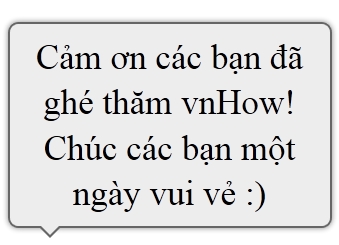
 
 
Cách tạo thông báo ấn tượng cho website bằng CSS

Không cần phải dùng đến hình ảnh, bạn vẫn có thể tạo được những thông báo đẹp mắt cho website với những tính năng của CSS.


Hướng dẫn

  • 1

    Đầu tiên các bạn dùng đoạn mã HTML sau với nội dung thông báo muốn hiển thị

    <div class="chat-bubble">
    	Cảm ơn các bạn đã ghé thăm vnHow! Chúc các bạn một ngày vui vẻ :)
      <div class="chat-bubble-arrow-border"></div>
      <div class="chat-bubble-arrow"></div>
    </div>
  • 2

    Tiếp theo chúng ta sử dụng đoạn CSS sau để định dạng cho thông báo

    .chat-bubble {
      background-color:#EDEDED;
      border:2px solid #666666;
      font-size:35px;
      line-height:1.3em;
      margin:10px auto;
      padding:10px;
      position:relative;
      text-align:center;
      width:300px;
      -moz-border-radius:10px;
      -webkit-border-radius:10px;
      -moz-box-shadow:0 0 5px #888888;
      -webkit-box-shadow:0 0 5px #888888;
    }
    .chat-bubble-arrow-border {
      border-color: #666666 transparent transparent transparent;
      border-style: solid;
      border-width: 10px;
      height:0;
      width:0;
      position:absolute;
      bottom:-22px;
      left:30px;
    }
    .chat-bubble-arrow {
      border-color: #EDEDED transparent transparent transparent;
      border-style: solid;
      border-width: 10px;
      height:0;
      width:0;
      position:absolute;
      bottom:-19px;
      left:30px;
    }
  • 3

    Toàn bộ đoạn mã như sau

    <html>
    	<head>
    		<meta http-equiv="Content-Type" content="text/html; charset=utf-8" />
    		<style type="text/css">
    			.chat-bubble {
    			  background-color:#EDEDED;
    			  border:2px solid #666666;
    			  font-size:35px;
    			  line-height:1.3em;
    			  margin:10px auto;
    			  padding:10px;
    			  position:relative;
    			  text-align:center;
    			  width:300px;
    			  -moz-border-radius:10px;
    			  -webkit-border-radius:10px;
    			  -moz-box-shadow:0 0 5px #888888;
    			  -webkit-box-shadow:0 0 5px #888888;
    			}
    			.chat-bubble-arrow-border {
    			  border-color: #666666 transparent transparent transparent;
    			  border-style: solid;
    			  border-width: 10px;
    			  height:0;
    			  width:0;
    			  position:absolute;
    			  bottom:-22px;
    			  left:30px;
    			}
    			.chat-bubble-arrow {
    			  border-color: #EDEDED transparent transparent transparent;
    			  border-style: solid;
    			  border-width: 10px;
    			  height:0;
    			  width:0;
    			  position:absolute;
    			  bottom:-19px;
    			  left:30px;
    			}
    		</style>
    	</head>
    	<body>
    		<div class="chat-bubble">
    			Cảm ơn các bạn đã ghé thăm vnHow! Chúc các bạn một ngày vui vẻ :)
    		  <div class="chat-bubble-arrow-border"></div>
    		  <div class="chat-bubble-arrow"></div>
    		</div>
    	</body>
    </html>
  • 4

    Lưu lại đoạn mã trên vào một file chẳng hạn index.html và chạy để thấy kết quả.

  • 5

    Đoạn mã trên không chạy được trên IE6 do IE6 không hỗ trợ border transparent, để khắc phục điều này bạn thêm vào đoạn CSS sau

    /* IE6 */
    .chat-bubble-arrow {
        _border-left-color: pink;
        _border-bottom-color: pink;
        _border-right-color: pink;
        _filter: chroma(color=pink);
    }
 
 
Hãy click like để theo dõi các bài viết mới của vnHow trên Facebook!


Bài liên quan


Tham khảo


Bình luận


Lập trình


Bạn phải đăng nhập để thực hiện chức năng này.